What is a float value?
The float, or wear value, is a number from 0 to 1 that a skin gets when it's created: when it drops, comes out of a case or a trade-up contract. The lower the float, the cleaner the skin; the higher, the more scratched and faded its paint. The float is fixed for good: playing with a skin doesn't wear it down.
Float ranges of the CS2 exteriors
The float decides which of the five exteriors, or wear levels, a skin has:
| Exterior | Float range |
|---|---|
| Factory New (FN) | 0.00 – 0.07 |
| Minimal Wear (MW) | 0.07 – 0.15 |
| Field-Tested (FT) | 0.15 – 0.38 |
| Well-Worn (WW) | 0.38 – 0.45 |
| Battle-Scarred (BS) | 0.45 – 1.00 |
Not every skin comes in every exterior
Each skin has its own float range within 0 to 1. Doppler knives only go up to 0.08, so they exist only in Factory New and Minimal Wear, while some skins never come cleaner than Field-Tested. A few examples:
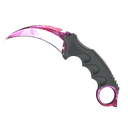


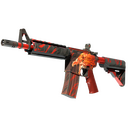

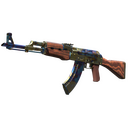
How the float changes a skin's look
Wear doesn't spread evenly: paint usually comes off the edges and most exposed parts first, and some finishes barely change across their range while others lose most of their design. That's why a low Field-Tested can look close to Minimal Wear, and why collectors pay extra for very low floats like 0.00x within an exterior.
Float vs. pattern seed
The float isn't the only number behind a skin's look. The pattern seed (the pattern template in the game, from 0 to 1000) decides where the pattern sits on the weapon, which matters a lot for finishes like Case Hardened, Fade and Doppler. Two skins with the same float can look completely different because of their seed.
How to check a skin's float
In CS2, inspect the item to see its wear rating and pattern template. Trading sites show the float on their listings. To see what the float does to a skin, open it in Skinspect: catalog skins let you sweep through their whole float range, and an inspect link loads the exact item with its own float and pattern.